
Overview
Overview
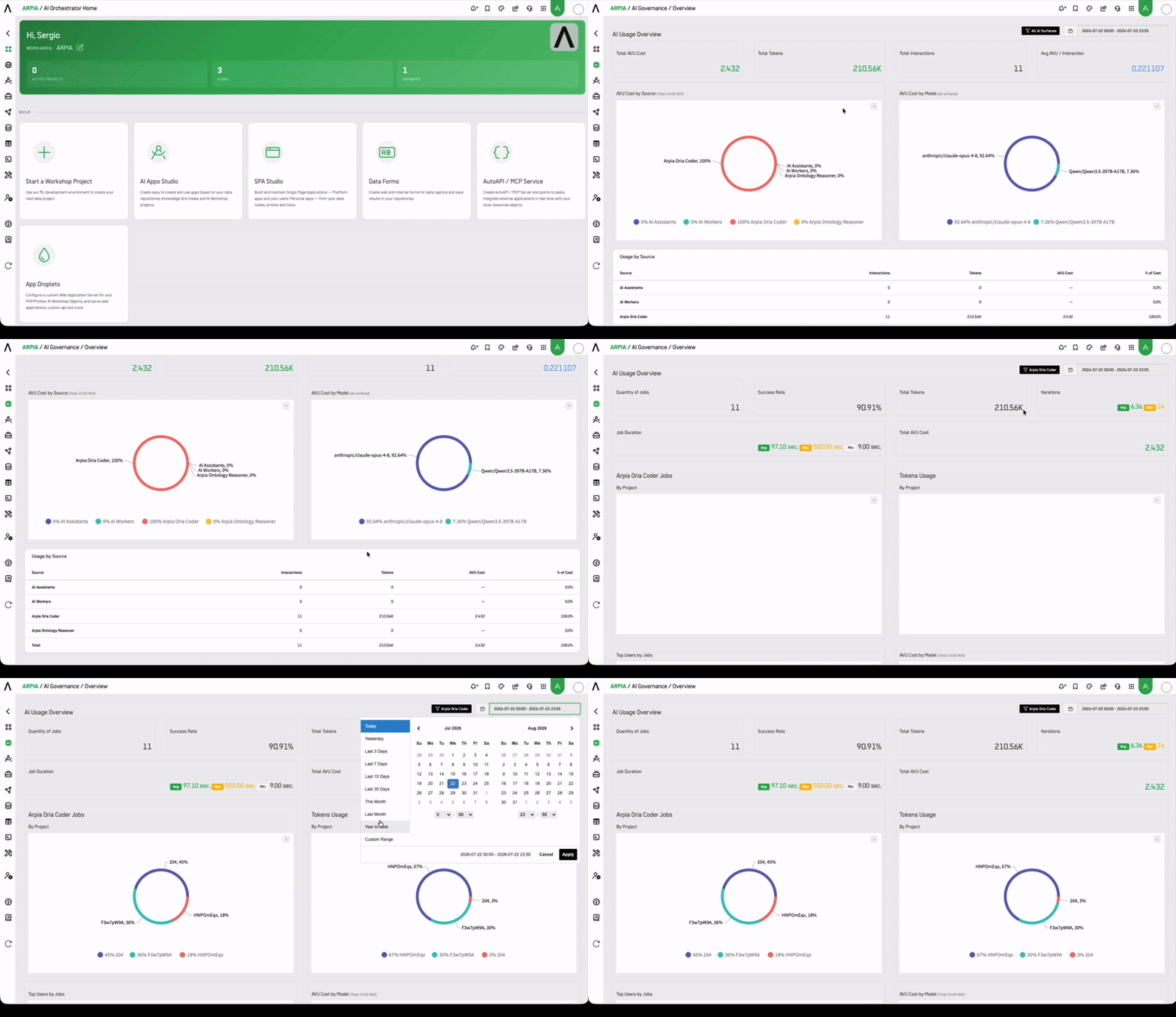
The AI Governance Overview provides a real-time operational dashboard that surfaces performance and usage metrics across your AI ecosystem. It is organized into three tabs — AI Assistants, AI Workers, and Arpia Codex — each scoped to a different layer of ARPIA's AI execution model.
Who Uses This Dashboard
| Role | How They Use It |
|---|---|
| CISO / Security Officer | Monitor provider health and detect anomalous token usage that may indicate abuse or misconfiguration. Validate that AI activity is within expected operational parameters. |
| Compliance Officer | Review success rates and job history to support audit readiness. Correlate AI activity with compliance obligations (SOC 2, ISO 42001). |
| CTO / Technical Lead | Track latency, iteration counts, and token consumption to optimize model selection and control infrastructure costs. |
| Platform Administrator | Identify high-volume users, monitor AVU cost by model, and manage capacity across projects and assistants. |
| AI Product Owner | Compare assistant performance over time, detect efficiency drops, and prioritize prompt or model improvements. |
Use Cases
Operational Health Monitoring
Use the AI Providers Status panel across all three tabs to detect real-time degradation from providers like OpenAI or Anthropic. When a provider shows a Minor or Major incident, correlate it with drops in Answers Efficiency or Success Rate to confirm impact and trigger escalation.
Cost Attribution and Budget Governance
Use Tokens Usage by Project and AVU Cost by Model to allocate AI spend across business units or Workshop Projects. Identify which models are driving the highest costs and evaluate whether usage justifies the expense.
SLA and Latency Baseline
Use Answering Duration (Average, Max, Min) across AI Assistants and AI Workers to establish performance baselines. Spikes in Max duration are early indicators of model or infrastructure issues before they affect end users.
Access Reviews and Usage Audits
Use Top Users by Jobs to identify concentration of Codex job submissions. Flag unusual volume from individual users as part of periodic access reviews or security investigations.
Incident Root Cause Analysis
Combine Job Duration, Success Rate, and AI Providers Status with a specific time window to reconstruct what happened during an AI incident — which provider was degraded, which projects were affected, and what the token and iteration costs were.
AI Assistants
Tracks the performance of conversational AI assistants deployed across your organization.
Quantity of Answers
Total number of responses generated by AI Assistants within the selected time window.
Answers Efficiency
Percentage of responses that met the expected quality or completion threshold. A low efficiency rate may indicate prompt engineering gaps or model degradation.
Answering Duration
Response time distribution across Average, Max, and Min values. Use this to identify latency outliers and establish SLA baselines.
Assistant Responses
Breakdown of responses by individual AI Assistant, enabling per-assistant performance comparison.
Assistant Tokens Usage
Token consumption by AI Assistant. Use this to monitor cost distribution and detect anomalous usage patterns.
AI Providers Status
Real-time health status of connected AI providers (e.g. Anthropic, OpenAI, Lambda). Displays last check time and operational status. A degraded provider can directly impact confidence scores and response quality across all assistants using that provider.
AI Workers
Tracks background AI processes that operate outside of direct user interaction.
Quantity of Logs
Total number of AI Worker execution logs within the selected time window.
Answering Duration
Execution time distribution (Average, Max, Min) for AI Worker jobs.
Log Responses
Breakdown of execution logs by individual AI Worker.
Tokens Usage
Token consumption by AI Worker, useful for identifying high-cost background processes.
AI Providers Status
Same provider health view as AI Assistants, contextualized for AI Worker execution.
Arpia Codex
Tracks autonomous AI jobs executed through the Arpia Codex engine.
Quantity of Jobs
Total Codex jobs executed in the selected period.
Success Rate
Percentage of jobs that completed successfully. A declining success rate warrants investigation into model availability, data quality, or job configuration.
Total Tokens
Aggregate token consumption across all Codex jobs.
Iterations
Number of reasoning iterations performed. Higher iteration counts indicate more complex jobs and higher compute cost.
Job Duration
Execution time distribution (Average, Max, Min) across all Codex jobs.
Codex Jobs by Project
Job volume broken down by Workshop Project, enabling cost and usage attribution at the project level.
Tokens Usage by Project
Token consumption attributed by project, supporting chargeback and budget governance.
Top Users by Jobs
Ranking of users by job submission volume. Useful for access reviews and capacity planning.
AVU Cost by Model
Cost breakdown by model in AVU (ARPIA Value Units), enabling model-level cost governance and optimization decisions.
Time Window
All metrics support the following time filters: Today, Yesterday, Last 3 Days, Last 7 Days, Last 15 Days, Last 1 Month. Select the appropriate window using the date picker in the top-right corner of the dashboard.
Updated 3 months ago