
Data Source
Configure the datasources that will be used for raw data extraction.
🌐 Data Source Overview
In ARPIA, a data source is any external repository of data that can be connected and accessed within the platform. This allows users to bring data from multiple systems into one place for integration, analysis, and management.
Supported Data Source Types
ARPIA supports a wide range of data connections, organized by category:
- Databases: MySQL, SingleStore / StarRocks, PostgreSQL, MSSQL (ODBC)
- Files: CSV, JSON
- Cloud Storage Services (AWS S3, Google Cloud Storage, Azure Blob, etc.)
- APIs (REST, GraphQL)
- Repositories (internal and external datasets)
- Other External Sources
Once connected, these sources can be managed directly in ARPIA's interface.
🔧 Data Source Management
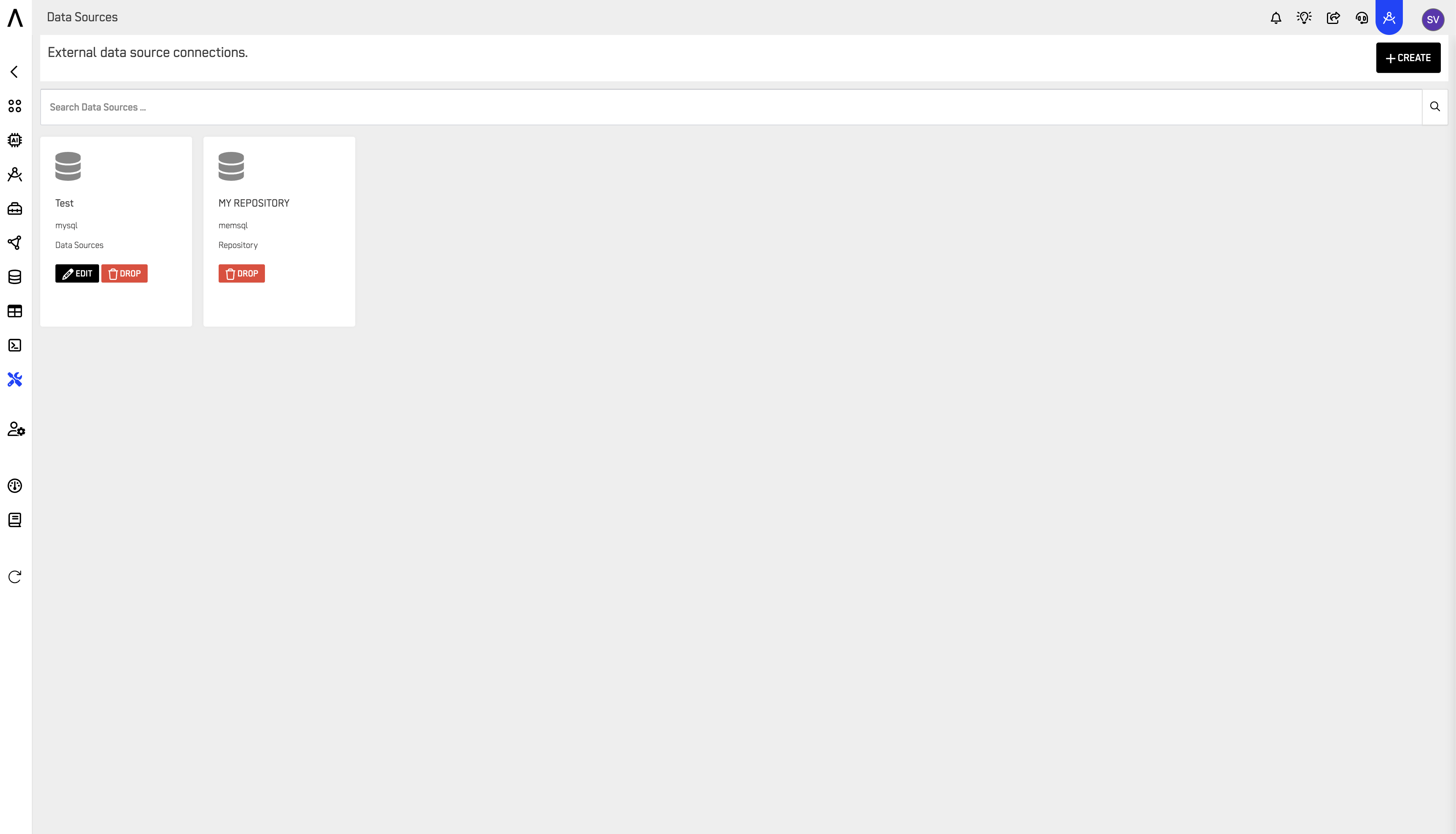
From the Data Sources panel, users can:
- Create new connections with the +CREATE button.
- Search across connected sources using the search bar.
- Edit existing sources to update credentials or configurations.
- Drop (remove) sources that are no longer needed.
Each source is displayed with its name, type, and quick-action buttons (Edit / Drop) for simple management.
Creating or Editing a Connection
Both New Source and Edit Connection use the same form:
- Name / Connection Name
- Connection Type (see Supported Data Source Types above)
- Use SSH Tunneling for extra security (optional checkbox)
- Server, Port, User, Password, Database Name
- Data source can be used as data repository (checkbox — flags this connection so it's also available as a Repository elsewhere in ARPIA)
Use Test Connection to verify credentials before saving. Save As lets you save the current form as a new connection without overwriting the original.
Repositories also appear here — but as Drop-only
A Data Source can be flagged, at creation or edit time, with "Data source can be used as data repository." Once flagged, it becomes available as a Repository elsewhere in ARPIA.
That link goes one way, though. From the Data Sources panel:
- Regular Data Sources (label: Data Sources): full access — Edit and Drop.
- Repositories (label: Repository): Drop only — no Edit button, and no way to view the connection details from this panel.
To view or edit a Repository's connection details, go to ARPIA → Resources → Data Repository tab (see below) instead.
Dropping a Repository here is destructive, not cosmetic
Clicking Drop on a Repository in the Data Sources panel doesn't just remove it from this view — it deletes the underlying repository connection entirely, including from ARPIA → Resources → Data Repository. The confirmation dialog ("Are you sure to drop this connection?") doesn't make this scope clear, so treat Drop on a Repository as permanent deletion, not a detach.
📁 Managing Repositories via Resources
Repository connections are created and edited from ARPIA → Resources → Data Repository tab (not from the Data Sources panel).
- The Resources page has three tabs: Data Repository, Computing, and Object Storage. It also shows your Workarea Plan and a Request Upgrade option.
- Each repository row shows its name, a source-type icon, and Allocated & Current Usage (e.g.,
0GB / 0GB (N/A%)), plus three action icons:- ⓘ Info — opens Repository Information: shows the Repository Name and ODBC Access Credentials (Server, Port, User, Password, Repository ID), with Close and Edit buttons. This is where you actually edit a Repository's connection.
- Two additional icons (usage/quick-action controls) are also available per repository — not yet documented in detail here.
- Use + Create Data Repository to provision a new one.
- The bottom of the page totals your current Allocated usage across all repositories.
💡 Key Benefits
- Seamless Integration: Connect multiple sources without complex setup.
- Centralized Management: View, search, and control all data sources in one place.
- Comprehensive Analysis: Leverage ARPIA's tools to query and analyze data from diverse origins.
- Scalability: Handle everything from small datasets to enterprise-scale repositories.
- Flexibility: Choose the data sources that fit your workflow and business needs.
👉 With ARPIA, managing data sources becomes streamlined, secure, and scalable, empowering teams to work with their data more effectively.
Updated 3 months ago