
Getting Started with ORIA Reasoner
Getting Started with ORIA Reasoner
Use this guide to open ORIA, set up a session, and get accurate answers from your data in 4 simple steps.
Opening ORIA: First Time vs. Later
First time opening ORIA: You land in an empty workspace. You must start a session from scratch.
Opening ORIA again: It automatically opens to the last session you had open — you pick up where you left off.
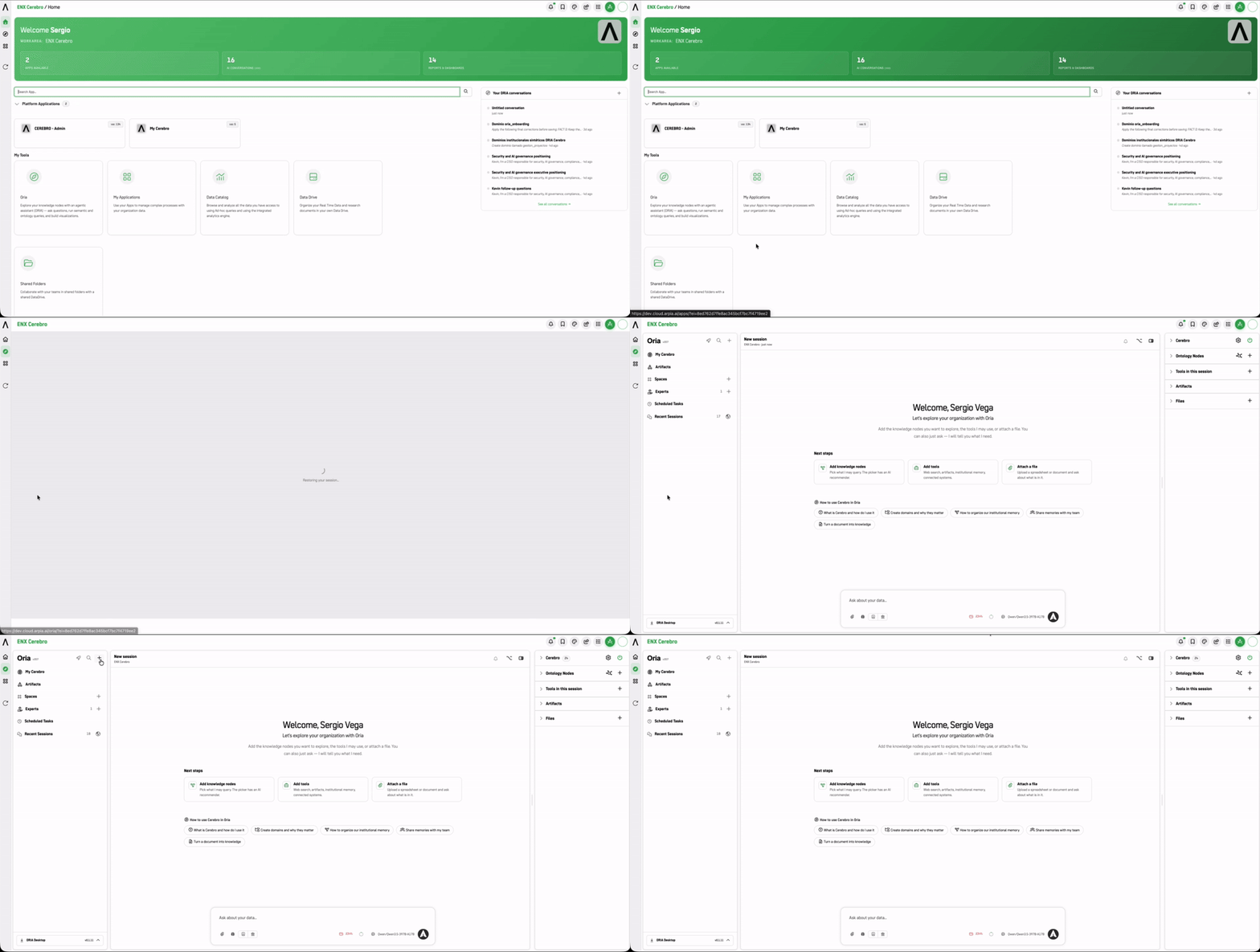
4-Step Basic Workflow
1. Start a Session
Click the + icon next to the magnifying glass in the left panel to launch a clean session (or select a pre-configured Expert / Space if available). Working in an Expert? You can open a shared session and collaborate with your team inside it.
Best Practice: Rename your session in the top header or sidebar to reflect the specific topic or question. Sessions are listed for later reference, and a clear name saves time when you come back to it.
2. Define What Oria Can Use
Once a session exists, the center panel guides you through setup with three cards:
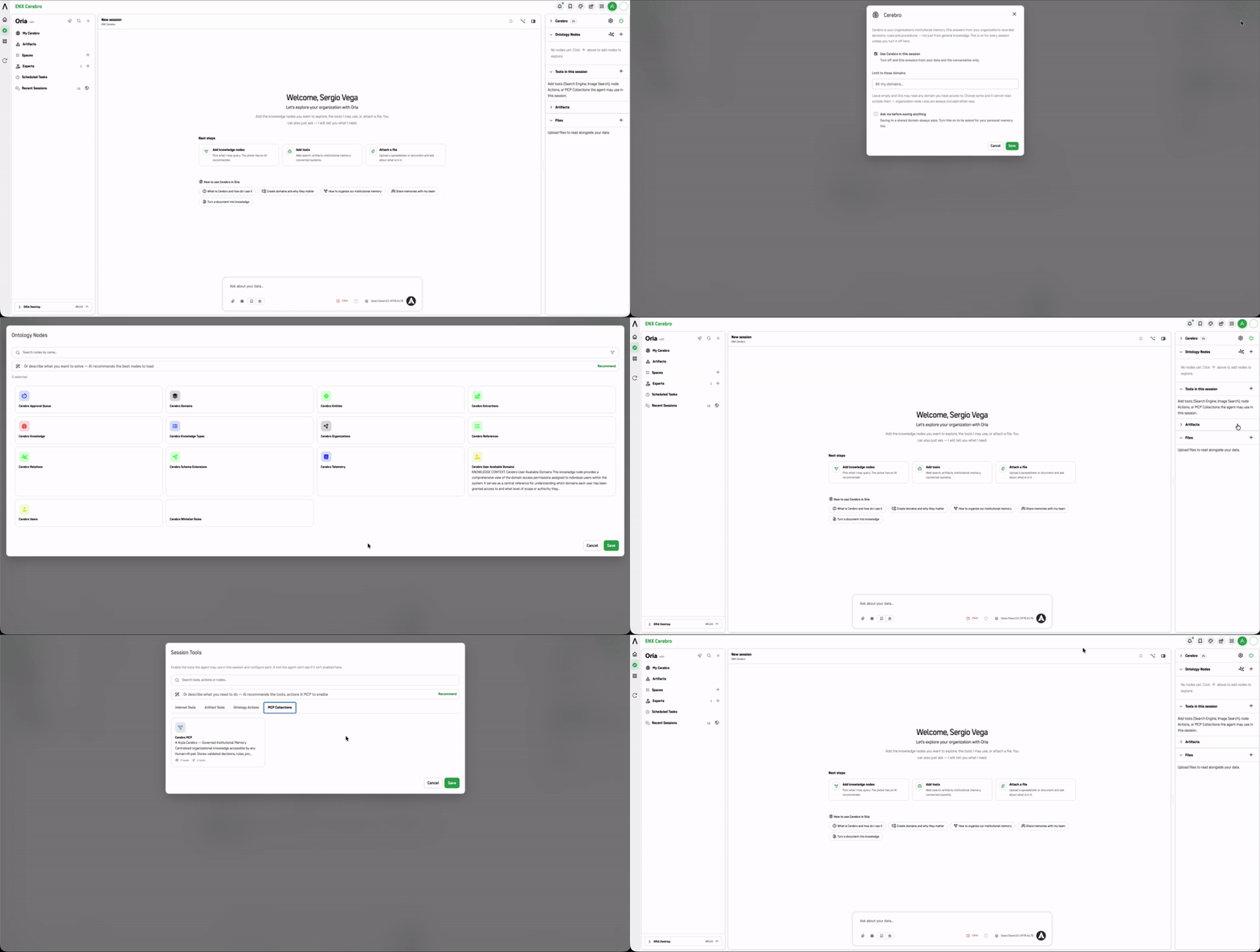
| Card | What it does |
|---|---|
| Add knowledge nodes | Pick what data Oria may query for your analysis. |
| Add tools | Enable web search, artifacts, or external connected tools, or let Auto add them for you. |
| Attach a file | Upload a spreadsheet or document to ask questions about its content. |
Keep your context focused on what your current question needs:
- Select Data Nodes: Pick only the relevant ontology nodes for your analysis.
Note: If no data nodes appear in your side panel, you can still query Oria using standard prompts, uploaded documents, or enabled session tools. Contact your platform administrator if you need access to specific enterprise ontology nodes.
- Choose How Tools Get Added: Check the badge next to Tools in this session.
- Auto: Oria adds the tools your request needs by itself. This is the fastest way to start. It never adds Oria Machine, Image Studio, or Databases, so add those yourself with
+when you need them. - Manual: Turn on only the capabilities your question requires, or click Recommend to let Oria suggest them.
Heads up: Auto uses more tokens. Every request carries the tool catalog, and each tool Auto adds stays in the session. The Auto setting applies to all your sessions, not just this one.
- Auto: Oria adds the tools your request needs by itself. This is the fastest way to start. It never adds Oria Machine, Image Studio, or Databases, so add those yourself with
- Attach Files (Optional): Drop any supporting PDFs, CSVs, or spreadsheets directly into the session.
For a detailed breakdown of all screen panels and controls, see The Session Workspace.
3. Ask Your Question
Type your request in plain language into the prompt box, or click a Starter Button if you launched from a pre-configured template.
4. Review & Save
- Read the generated answer and check the cited source references to verify the output.
- Click Pin to Artifacts on any useful result you want to save for future reference.
Golden Rule: Keep It Lean
Start Small: Adding unnecessary data sources or tools dilutes answer accuracy. Always start with the minimum required to answer your question, and only widen the context if Oria needs more information.
With Auto on: Tools Oria adds stay in the session, so context grows as you go. For long sessions or repeated tasks, switch to Manual and enable only what that task needs, or start a new session when you change topics.
Making ORIA Your Landing Page
You can have ORIA Reasoner open directly after you sign in, instead of the ARPIA home page.
The Start in Oria? dialog offers this when you first enter.
| Option | What happens |
|---|---|
| Yes, start in Oria | You land in the Oria workspace immediately after signing in |
| Not now | You keep the standard home page |
| Don't ask me again | Suppresses the prompt; your current setting stays as it is |
This is not a one-way choice:
- The 🚀 toggle in the Sessions panel (top-left, next to +) switches the behavior at any time.
/?home=1always opens the classic home page, regardless of your setting.
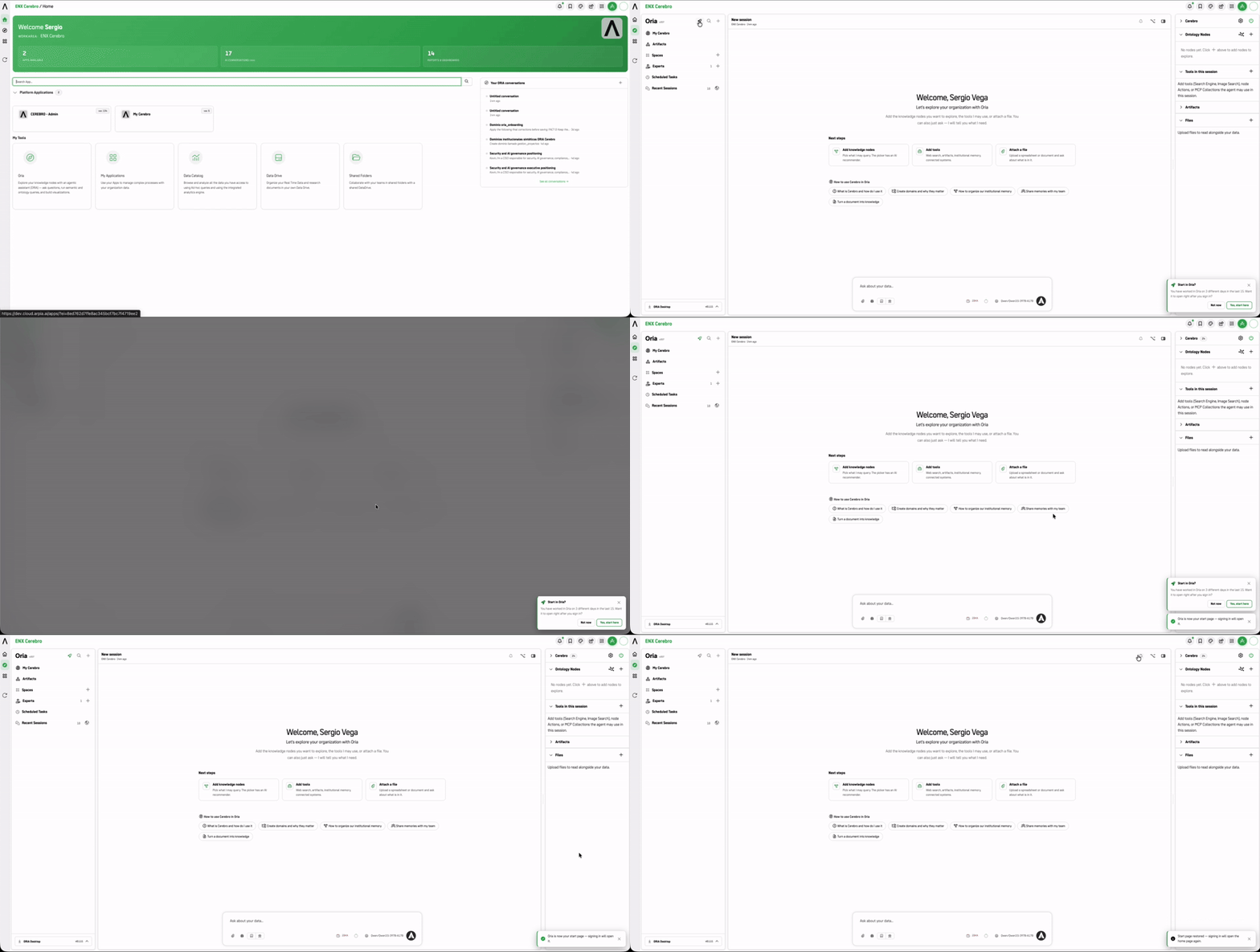
Tip: If you previously set ORIA as your default landing page, clicking the 🚀 again will disable this setting, bringing you back to the standard ARPIA home page upon login.
Elevate Your Workflow: Next Steps & Advanced Capabilities
Once you master the basic 4-step workflow, take your productivity further with these advanced features:
- Standardize Frequent Work: If you find yourself repeatedly picking the same tools and instructions, package them into an Expert with a fixed scope. Experts also support shared sessions, so your team can work with the same Expert together in real time.
- *If you want to learn more, check the guide here: Experts in ORIA Reasoner*
- Collaborate in Real Time: Share a Space to work on a common set of documents, or invite teammates into a shared session inside an Expert to work through a question together. Both use turn-based execution ("Who Has the Wheel") so only one person drives at a time.
- *If you want to learn more, check the guide here: Spaces in ORIA Reasoner*
- Automate Recurring Tasks: Turn your successful query into a Scheduled Task to let Oria execute background analysis automatically on a set daily or weekly schedule.
- *If you want to learn more, check the guide here: Scheduled Tasks in ORIA Reasoner*
Next: Configure Your Session
Once you have a session open, move to The Session Workspace to understand what each panel does.
Updated 8 days ago