
Advanced Guide: Cerebro Configuration, Ingestion & Governance
This guide is designed for workspace administrators, knowledge managers, and power users who need to manage Cerebro domains, control access, ingest files, and understand the deep systemic rules and known limitations of ORIA Reasoner's memory layer.
Centralized Management in "My Cerebro"
Beyond the in-session Reasoner tools, you can manage your institutional memory globally from the left-hand navigation panel.
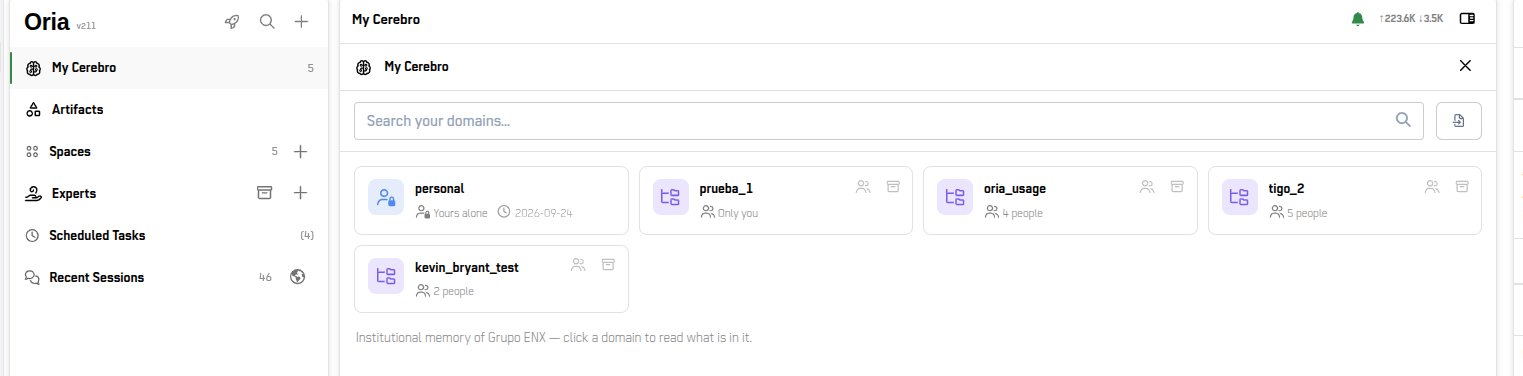
Navigating to My Cerebro opens your domain dashboard. Here, you can view all domains you have access to (both personal and shared), see how many people collaborate on each, and access tools for bulk ingestion and access control.
Mass Knowledge Ingestion (Importing Files)
You can turn existing documentation directly into institutional memory.
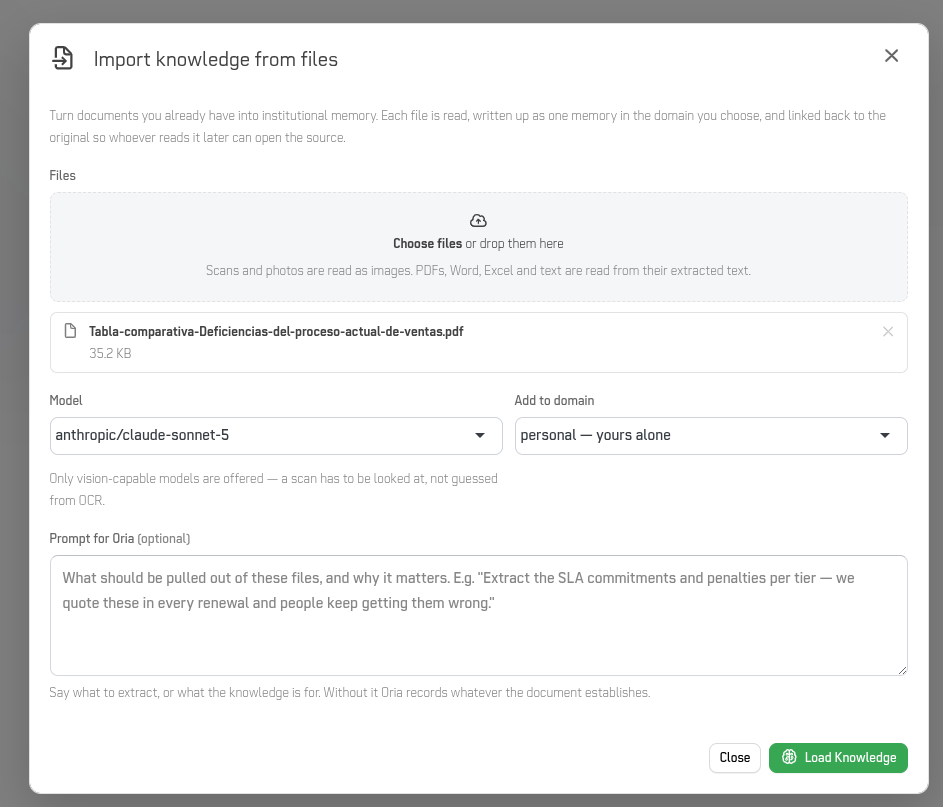
Click the import button within a domain to open the Import knowledge from files dialog.
-
Supported Formats: PDFs, Word, Excel, plain text, and even image scans.
-
Model Selection: Only vision-capable models are offered to ensure scans are physically analyzed, not just guessed from image scans.
-
Prompt for Oria (Crucial): Use this optional field to instruct the model on exactly what to extract (e.g., "Extract only the SLA commitments and penalties"). Without this, Oria will simply record a general summary of whatever the document establishes.
Domain Access Control

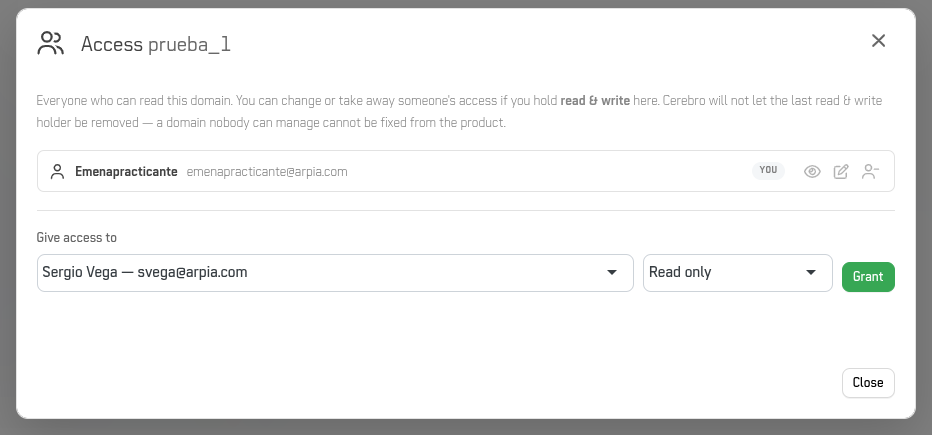
If you hold Read & Write permissions for a domain, you can manage who else has access to it.
-
Permission Levels: You can grant either
Read onlyorRead & writeaccess to workspace members. -
Failsafe Rule: Cerebro will not allow the last
Read & writeholder to be removed. A domain that nobody can manage cannot be fixed from the product interface.
Advanced Saving and Persistence
Memory Saving Rules
When working in a session, keep these core behaviors in mind before writing to Cerebro:
- Shared-domain saves always ask for confirmation.
- Personal-memory saves happen instantly (unless you have explicitly turned on the setting to be asked first).
- Save exactly what you see. The saved title and content must be identical to what you approved during the conversation.
The Strict 15-Day Edit Window
A memory is editable only within 15 days of creation — no exceptions. After 15 days, the record is permanently frozen. If a piece of knowledge becomes obsolete or needs correction after this window, your only path is to mark it INACTIVE and save a new, corrected memory in its place. Get the save right the first time.
Advanced Scoping & Known Bugs
The Single-Domain Defect (Critical)
When configuring Cerebro for a session in the right-hand panel, scoping deliberately produces sharper answers. However, there is a confirmed defect: the global domain is silently excluded when exactly one domain is passed.
This means organizational immutable rules are not applied if you only select one domain. Until patched, treat a single-domain selection as a risky configuration. You should either:
-
Select two or more domains.
-
Leave the domain picker completely empty (which queries everything you have access to).
Working Safely & Known Anti-Patterns
If you are treating Cerebro as an authoritative source, you must be aware of how the model interacts with the memory layer.
-
The Confidence Trap (Fabrication): Models learn institutional structure accurately but can sometimes fabricate specific details (CVE IDs, specific metrics, exact dates) while sounding completely confident. Always verify specifics against the source memory.
-
Fact Inversion: Cerebro's search synthesis layer has occasionally produced fact inversions (asserting the opposite of what the source memory actually says). This is why asking for and checking the attribution block is mandatory.
-
The Frozen Artifact: Pinning an answer to the Artifacts panel creates a static snapshot. It does not auto-update if the source memory is corrected, retired, or expires. Always keep attribution inside the artifact if it will be referenced later.
-
Memory is NOT Approval: Cerebro records that a decision was made in the past. An answer stating "the procedure is X" is a record of a procedure, not managerial sign-off to execute it today. Normal change management still applies.
-
No Structural Authoring: The Reasoner cannot create or modify tables, ontology nodes, or repository structures from the chat interface. It can only read and write memories.
Updated 21 days ago