
Agents in ORIA Reasoner
Agents in ORIA Reasoner
How to Navigate to Agents
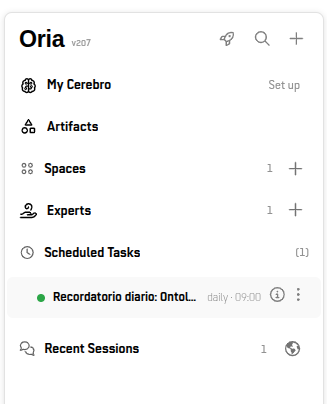
To view or manage your agents:
- Sidebar Navigation: Locate the Agents section in the left navigation panel.
- Agent List: Click Agents to view all active, paused, or historical recurring runs along with their execution counters.
How to Create an Agent and What Each Option Does
You can promote three types of sessions to an agent:
- Individual sessions: Your own sessions.
- Expert sessions: Sessions run from an Expert.
- Space sessions: Sessions run within a Shared Space.
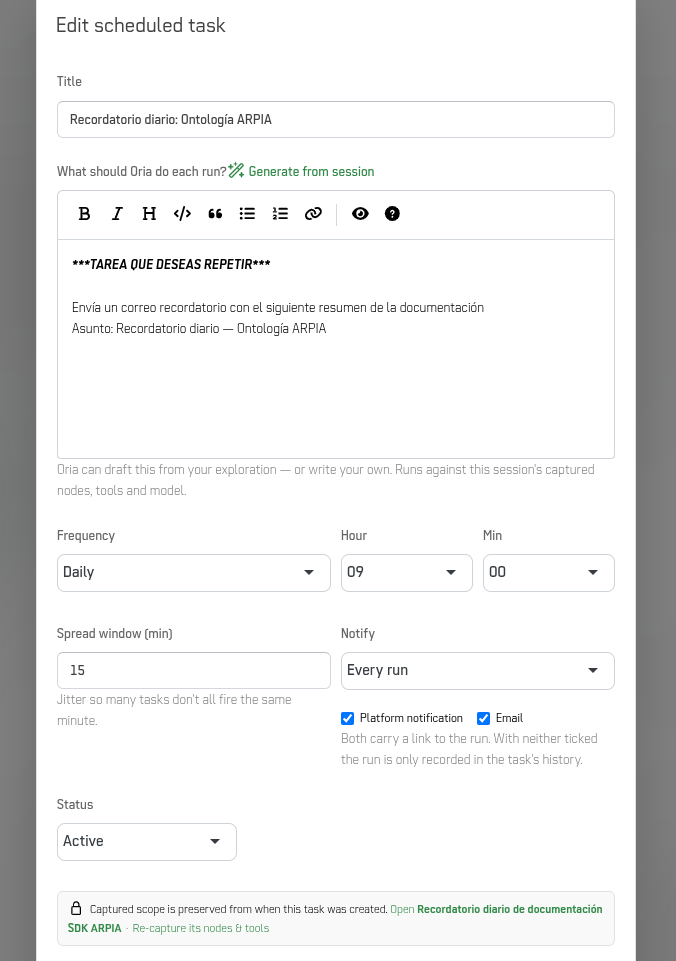
To create an agent, open the session, select the options icon in the top right of the session header, and choose Promote to Agent.... This opens the agent configuration modal with the following options:
| Field / Option | Description & Function |
|---|---|
| Title | The name of the agent as it will appear in your agent list (e.g., Exploración de datos adjuntos). |
| What should Oria do each run? | The detailed instructions Oria will execute on every run. You can type instructions manually or click Generate from session to automatically draft a prompt based on your active session's history. |
| Frequency | Sets how often the agent runs (e.g., Daily, Weekly, Monthly). |
| Hour & Min | Defines the exact time of day when the agent should trigger. |
| Spread window (min) | Sets a time buffer (in minutes) to stagger execution times, preventing multiple agents from firing at the exact same second. |
| Notify | Controls execution alerts. Options include Every run, On failure, or Never. |
| Notification Channels | Checkboxes for Platform notification and Email. Unchecking both keeps the run recorded in the agent history without sending direct alerts. |
Captured Context Note: Every agent run captures the exact nodes, tools, and model active at the moment of promotion. Each run executes in a fresh background session with this saved scope.
Saving Options: Click Create to activate the agent, or Cancel to exit without saving.
Key Behaviors of Agents
- Fresh Session Scope: Each agent run starts a clean background session. It retains the original tool and data permissions without mixing conversation history across runs.
Use Cases
The examples below are illustrative. Each one assumes a session that already works well interactively, which you then promote so it runs on a schedule.
| Use Case | Example | Typical Source Session | Typical Frequency |
|---|---|---|---|
| Recurring reports | A weekly summary of sales figures pulled from the same data source each Monday. | Individual session or Space session | Weekly |
| Data exploration on new files | A daily review of newly attached spreadsheets to flag missing values or outliers. | Individual session | Daily |
| Compliance and log reviews | A recurring check of access logs or policy controls against a documented checklist. | Expert session | Daily or weekly |
| Team monitoring | A monthly status digest for a shared project, sent to the team's Space. | Space session | Monthly |
| Standardized analysis | An Expert's analysis run on a fixed schedule so results stay comparable over time. | Expert session | Weekly or monthly |
Tip: Promote a session only after its prompt and tools produce the output you want. Agents repeat the saved instructions as written, so a vague prompt produces vague output on every run.
When to Use an Agent
| Situation | Solution |
|---|---|
| A daily or weekly report that requires running the same query on updated data | Agent |
| Periodic compliance checks or log reviews | Agent |
| Interactive, real-time collaboration with team members | Use a Shared Space |
| On-demand analysis with pre-configured tools | Use an Expert |
Updated 8 days ago